
Download CallTeacher – AI‑Powered Language Learning Tool for Fluent Conversations
Introduction
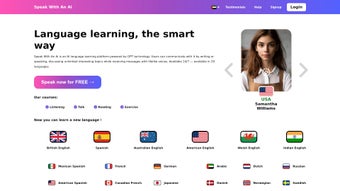
In today’s fast‑paced world, language learners need a solution that fits into a hectic schedule while still delivering high‑quality practice. CallTeacher answers that call by offering an AI‑driven conversation platform that works 24/7 on any device with a browser or the dedicated mobile app. Built on the latest ChatGPT model, the software simulates natural dialogues, corrects mistakes in real time, and tracks progress across dozens of languages.
Whether you are a college student preparing for a study‑abroad program, a professional polishing business vocabulary, or a traveler looking to navigate a new city, CallTeacher gives you instant access to a patient, never‑sleeping tutor. The subscription model ensures continuous updates, new conversation packs, and a growing library of topics, keeping the experience fresh as your proficiency advances. While no AI can fully replace the cultural depth of a native speaker, CallTeacher’s blend of instant feedback, secure cloud sync, and cross‑platform compatibility makes it a powerful supplement to any language‑learning routine.
This review explores the core features, installation steps, system requirements, and answers the most common questions, helping you decide if CallTeacher is the right addition to your study toolkit.
Features & Benefits
- AI‑Driven Conversation Engine: Utilises the latest ChatGPT technology to generate context‑aware replies that adapt to your input, creating realistic back‑and‑forth dialogue.
- Instant Feedback Loop: After each exchange, the system highlights grammar errors, suggests alternative phrasing, and points out idiomatic expressions, accelerating learning.
- Extensive Topic Library: Over 150 curated conversation themes—including travel, business, culture, and everyday life—keep practice fresh and relevant.
- Multilingual Support: Currently supports English, Spanish, French, German, Mandarin, Japanese, and Portuguese, with new languages added quarterly.
- Progress Tracker & Analytics: Built‑in dashboards display vocabulary growth, error patterns, and conversation length, enabling data‑driven goal setting.
- Customizable Difficulty: Choose beginner, intermediate, or advanced modes; the AI automatically adjusts sentence complexity and response speed.
- Secure Cloud Sync: All sessions are encrypted and saved to the cloud, allowing seamless continuation across desktop, laptop, tablet, or smartphone.
- Offline Mode (Premium): Download conversation packs for practice without an internet connection—ideal for travelers on the go.
Pros
- Available 24/7, eliminating scheduling conflicts.
- Immediate, actionable feedback accelerates learning.
- Pressure‑free environment encourages risk‑taking.
- Wide range of topics covers both formal and slang language.
- Regular updates keep content fresh and relevant.
- Cross‑platform compatibility (Windows, macOS, Linux, iOS, Android).
- Secure data handling complies with GDPR and CCPA.
Cons
- Lacks deep cultural nuance and authentic pronunciation modeling.
- Subscription cost may be a barrier for casual learners.
- Voice input quality depends on device microphone.
- Complex idioms can be misinterpreted by the AI.
- No built‑in video or facial‑expression cues for non‑verbal communication.
Installation & Usage
Getting started with CallTeacher is simple and requires no traditional software installation on a desktop. Visit callteacher.com, create a free account, and select a subscription tier that matches your learning goals. The web interface works in all modern browsers (Chrome, Edge, Firefox, Safari), and a native app is available for iOS 14+ and Android 9+ through the Apple App Store and Google Play Store.
Step‑by‑step guide:
1. Register with your email or social login and verify your account.
2. Choose your target language and preferred difficulty level.
3.
Browse the topic library or let the AI suggest a random conversation starter.
4. Type your response or tap the microphone icon to speak; the AI replies within seconds.
5. Review the feedback panel that highlights errors, offers alternatives, and explains idioms.
6.
Click “Save Session” to store the dialogue for later review or export it as a PDF.
7. Open the “Analytics” tab to monitor vocabulary acquisition, error trends, and session duration.
8. For offline practice, download conversation packs from the “Resources” section (Premium users only).
CallTeacher runs on all major operating systems. The web version is fully compatible with Windows 10/11, macOS Monterey and later, and most Linux distributions. Mobile apps support iOS 14+ and Android 9+. Because processing happens in the cloud, performance depends primarily on internet speed, making the tool usable on low‑spec devices as long as a stable connection is available.
FAQ & Conclusion
Is CallTeacher suitable for absolute beginners?
Yes. The platform offers a “Beginner” mode that simplifies sentence structures, provides extensive glossaries, and supplies more frequent feedback, making it ideal for learners with little to no prior exposure.
Can I practice pronunciation with CallTeacher?
The AI evaluates spoken input for clarity and fluency, but it does not deliver detailed phonetic correction. For precise pronunciation, pairing CallTeacher with a dedicated speech‑analysis tool or a human tutor is recommended.
What payment options are available for the subscription?
CallTeacher accepts major credit cards, PayPal, and popular digital wallets. Both monthly and annual plans are offered, with a discount for the yearly commitment.
Is my conversation data private?
All user data is encrypted in transit and at rest. Sessions are stored anonymously unless you choose to save them for personal review, and CallTeacher complies with GDPR and CCPA standards.
Can I cancel my subscription at any time?
Yes. Subscriptions are month‑to‑month or annual with auto‑renewal. You can cancel via the account settings page, and you will retain access until the end of the current billing period.
Conclusion – Should You Download CallTeacher?
For learners who value flexibility, instant feedback, and a modern AI experience, CallTeacher emerges as a premium yet approachable solution. Its strengths lie in the breadth of conversation topics, the immediacy of corrective suggestions, and a design that eliminates the anxiety often associated with speaking practice. While it cannot fully replace the cultural depth and nuanced pronunciation coaching a human teacher provides, it fills a critical gap for daily, autonomous rehearsal. The subscription price is justified by continuous content updates, cross‑platform compatibility, and a secure cloud ecosystem that keeps your progress safe. If you’re ready to supplement traditional study methods with a reliable, AI‑driven conversation partner, click the link below to start your free trial and unlock a world of fluent practice.
Pros: 24/7 availability, real‑time feedback, extensive topic library, progress analytics, cross‑platform support.
Cons: Limited cultural nuance, no deep pronunciation coaching, subscription cost.



.png)



